

Configuration
An onboarding configuration defines how a datasource becomes a dataset.
It contains the modelling and preprocessing choices used during onboarding, including the prediction type, target, feature groups, categorical handling, missing-value handling, encoding behaviour, and sharding.
Initial and incremental configurations
Onboarding configurations are created as either INITIAL or INCREMENT.
An initial configuration is used when creating a new dataset. It includes the prediction type and the target field for the model.
An incremental configuration is used when updating an existing dataset. It keeps the same dataset context and can adjust onboarding behaviour for the update.
Configure preprocessing
Most onboarding settings are optional. Keep the defaults unless the dataset needs a specific preprocessing choice.
Prediction type and target
Initial configurations set the prediction type and target.
The platform supports CLASSIFICATION and REGRESSION. Configure a single target field for the model.
Categorical values
Categorical handling is controlled by several settings:
For more detail on encoding choices, see Encoding.
Missing values
impute controls whether missing values are imputed during onboarding.
When missing values are important to the modelling task, decide whether to clean them before ingestion or handle them during onboarding.
Feature groups
Feature groups let related features be treated together during modelling and explanations.
A feature group has a name and at least two features.
Sharding
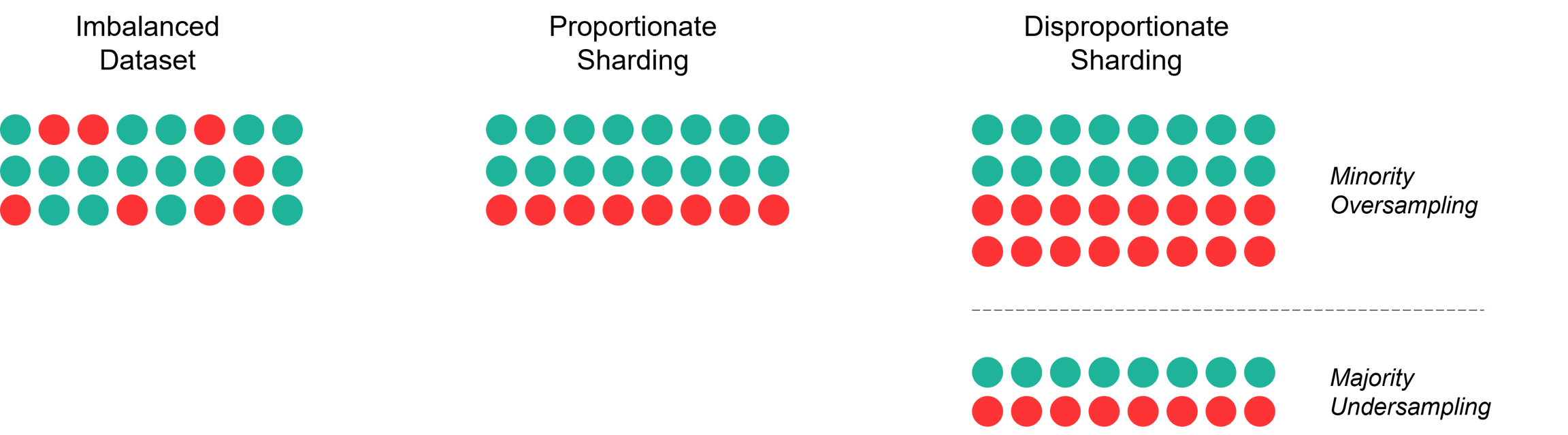
Sharding controls how data is divided during onboarding.
If no sharding strategy is provided, the default depends on the prediction type: PROPORTIONATE for classification and RANDOM_APPROXIMATE for regression.
For imbalanced classification datasets, a disproportionate sharding strategy may be more appropriate than the default.
Retrieve configurations
Retrieve onboarding configurations when you need to reuse an existing configuration.
To inspect a specific configuration, retrieve it by id.
Update a configuration
Update an onboarding configuration when you need to rename it.
Delete a configuration
Delete an onboarding configuration when it should no longer be used by future onboarding jobs.