

Encoding
Encoding controls how non-continuous values are represented during onboarding. Most datasets do not need manual encoding configuration. Define the field’s semantic_type in the schema, and let Umnai choose the encoding during processing. Set encoding_type only when you need a specific behaviour.
Choose an encoding
Use encoding for fields that are not already continuous numerical values.
The onboarding configuration also includes one_hot_encoding_max_categories, which controls when categorical fields switch from one-hot encoding to target encoding if encoding is inferred.
Categorical encoding
Categorical features need to be represented numerically before they can be used for modelling.
One-hot encoding
One-hot encoding represents each category as a separate binary feature.
For example, a colour field with values red, blue, and green becomes separate indicators for each category. A row with colour = blue activates the blue indicator and leaves the others inactive.
Use one-hot encoding when a categorical feature has a small, stable set of values.
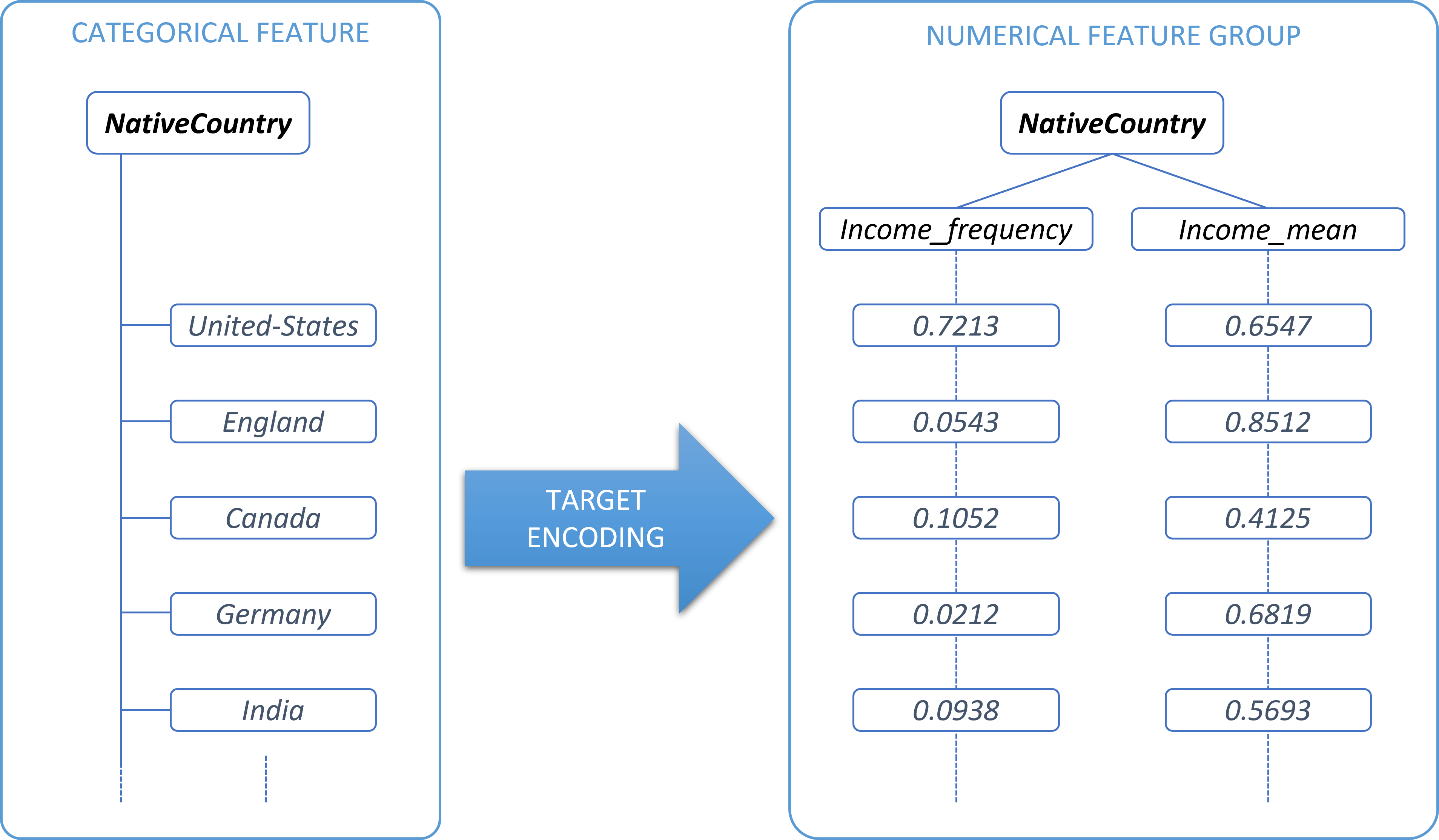
Target encoding
Target encoding is useful for categorical features with many distinct values.
Instead of creating one binary feature per category, Umnai represents each category using information derived from the target. This can reduce the number of generated features and make high-cardinality categorical fields easier to use.
Use target encoding when a categorical feature has many values and one-hot encoding would create too many features.
Label encoding
Label encoding assigns each category an integer value.
LABEL encoding is exposed in the API, but it is not currently supported for general use. Use ONE_HOT or TARGET for categorical features unless you have confirmed that label encoding is supported for your workflow.
Date and time encoding
Timestamp encoding expands a date or time field into derived temporal features, such as year, month, day, day of week, quarter, and related calendar indicators.
Use TIMESTAMP when a field contains time information that may be useful to the model.
Typical timestamp fields include:
Timestamp-encoded fields are treated as feature groups during modelling and explanations.
Text encodings
The API exposes GLOVE and GPT as encoding types.
Free-form natural language text is not currently supported for processing. Do not use GLOVE or GPT encoding unless you have confirmed that the workflow supports it. Transform text before ingestion, or mark text columns as ignored if they must remain in the source data.
Encoding options during onboarding
Some encoding behaviour is controlled in the onboarding configuration rather than the schema.
For most workflows, keep the defaults unless you are addressing a specific data quality or performance issue.
Encoding strategy
encoding_strategy controls how onboarding performs encoding.