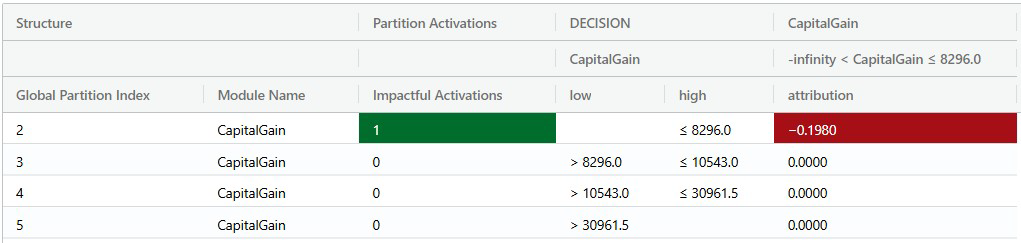
Decision action table
The Decision Action Table, or DAT, brings the key components of a local explanation into a single table.
It is designed to make the main components of each decision easier to inspect: the activated rules, the conditions that triggered them, the resulting actions, and the attribution values associated with those actions.
What the DAT contains
The DAT provides a detailed view of rules, attributions, decompositions, and activations for a decision-making model based on an Explanation Structure Model (ESM).
It can include:
Decision and action
The DAT combines two perspectives: decision and action.
The decision part of the table breaks down the conditional_expression for each bin of each rule in each partition of the model. It shows which partitions were activated for a query and why those partitions applied.
The action part of the table shows the decomposed attribution or activation from each activated bin. This connects the condition that activated with the contribution that resulted from it.
Together, these views make it possible to trace a prediction from query conditions to activated model structures and attribution values.
Why the DAT is useful
The DAT is designed to support detailed local explanation work.
Filtering the DAT can provide a quick summary of the conditions associated with a query and the resulting actions.
Examples