Identifying bias
Bias can be inspected at two levels: in an individual prediction, and in the model as a whole.
At prediction level, control swaps can compare a query with an alternative version of the same query where a protected or sensitive categorical value has been changed. At model level, module dependency plots, or MDPs, can show whether model behaviour differs across categories such as Gender.
Bias in a prediction
Bias in an individual prediction can be inspected with a control swap.
For example, to check a query where the protected feature Gender is Female, the query can be re-run with Gender set to Male.
The two runs can then be compared:
Any difference in attributions can show whether Gender bias is present. That bias may or may not affect the final prediction.
For example, a swap may show attribution differences between Female and Male, while the predicted class remains unchanged. In another case, the attribution difference may be large enough to change the outcome.
Acting on prediction-level bias
Once prediction-level bias has been identified, the appropriate response depends on the level of bias, its effect on the prediction, and the relevant company policies.
Possible responses include:
The control swap page shows an example of using swaps to detect bias in a prediction.
Bias in a model
Bias can also be inspected at model level.
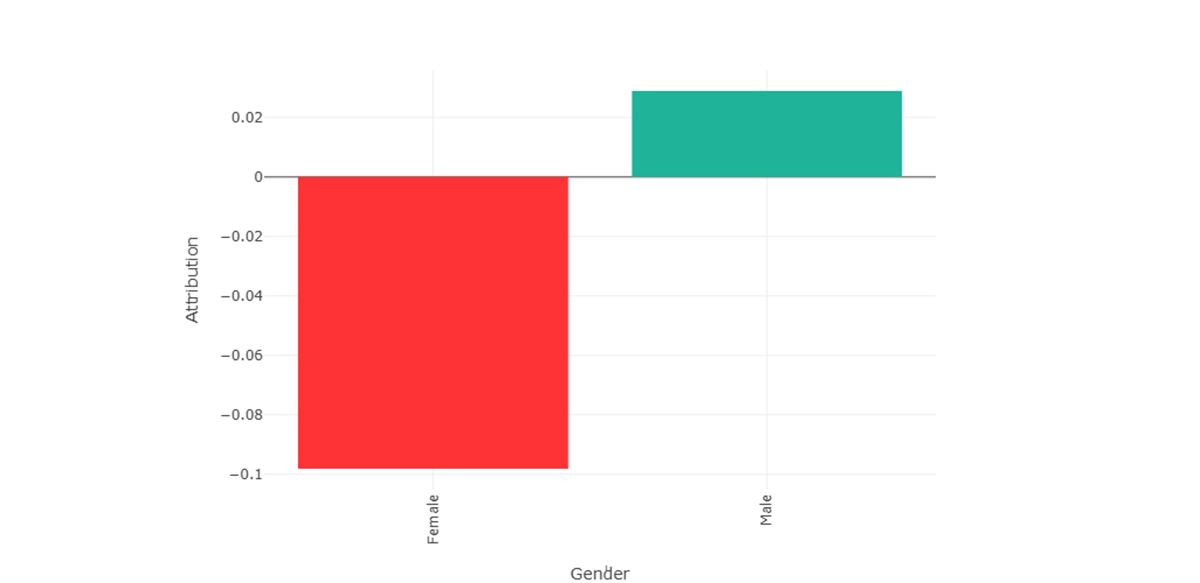
MDPs provide a way to identify potential bias by showing how attribution changes across the values of a feature or interaction.
For example, if MDPs related to Gender show different attribution behaviour for Male and Female, that indicates gender-related bias in the model behaviour.
This information can then support corrective action. For example, if a negative outcome for one gender would have been positive for another gender, a human can be brought into the loop to make the final decision.
Alternatively, an automated decision workflow can correct or equalise attributions related to Gender across modules, depending on policy and application requirements.